First Steps
Hello world
- Type the following in the JShell ↓
System.out.print("Hello World");
- The above line is an statement:
- A statement is a complete command to be executed
- Can include one or more expressions
- Statements are executed by JShell
- Printing information using syntax
Common Errors in JShell
- Forgetting closing parentheses
- Error: Incomplete code
- Forgetting closing double quote
- Error: Unclosed string literal
- Using single quotes for string (invalid)
- Error: Character literal
Variables
Variables and Keywords
- Keywords are reserved words with predefined meanings in Java
- Java syntax is case-sensitive, including keywords
- Keywords like 'int' and 'Int' are distinct
- Keywords are integral to Java's functionality
Primitive Data Types and Keywords
- int keyword represents integer
- Primitive data types: basic building blocks
- Exploration of various data types and keywords
Variables: Storing Information
- Variables store information in the computer
- Variables accessed by names, stored in memory
- Variables are changeable, contents are variable
- Specify data type and name for a variable
- Various data types available for variables
Defining Variables: Data Types
- Data types determine type of information stored
- Keywords and data types relationship
- Object-Oriented Java's flexibility with data types
- Focus on primitive data types in upcoming videos
- Defining an int variable: an abbreviation for integer
- Example:
int myFirstNumber = 5;
Defining Variables: Initialization
- Variable definition: data type, name, optional value
- Assignment operator: = for initialization
- Semicolon ends the line as a complete statement
Assignment and Initialization
- Initialization optional but necessary before use
- Value assigned to variable using expression
- Expression: coding construct evaluating to a value
- Java reads and executes statements in JShell
- Memory allocation for variables and accessing values
Accessing Variable Content
- Access variable content using its name
- Java manages memory and variable access
- Variable content accessed by referring to name
Declaring a variable and then printing it ↓
jshell> int myFirstNumber = 5;
myFirstNumber ==> 5

jshell> System.out.print(myFirstNumber);
5
Updating the variable value and printing it ↓
jshell> myFirstNumber = 1000;
myFirstNumber ==> 1000

jshell> System.out.print(myFirstNumber);
1000
using JShell command which will list all the statements we've executed and assigned
jshell> /list

   1 : {
       }
   2 : System.out.print("Hello World");
   3 : System.out.print("Hello Tim");
   4 : int myFirstNumber = 5;
   5 : System.out.print(myFirstNumber);
   6 : myFirstNumber = 1000;
   7 : System.out.print(myFirstNumber);
Expressions and Operators
- In previous examples, expressions on the right side of the equals sign have been simple literals: strings or numeric literals.
- The expression to the right of the equals sign can be more complex.
- Let's explore adding expressions that involve mathematical operations:
int result = 10 + 5;
- This sets the value of the variable 'result' to the sum of 10 and 5.
- Java recognizes the mathematical expression and calculates the result.
- We can use various operators like + and *.
int complexResult = 10 + 5 + 2 * 10;
- This computes a more complex expression: 10 + 5 = 15, then 15 + 2 * 10 = 35.
- Operators like +, -, *, / are familiar. There are more operators available.
- If interested, check the 'Bonus Lecture and Information' section for a downloadable list of all
Starting out with Expressions
- An expression is the code on the right side of the equals sign in an assignment or declaration statement.
- Expressions can be simple literals or complex mathematical equations.
Now we will learn how to replace literal values with variables in expressions:
- Variables provide flexibility by allowing dynamic values.
- We've used literals and operators in expressions before.
- Example expression:
int result = 10 + 5;
Challenge: Create two new variables, mySecondNumber (value: 12) and myThirdNumber (value: 6).
Command: /var lists created variables in JShell.
Replacing literals with variables:
- Use variable names directly in expressions.
- Example:
int total = myFirstNumber + mySecondNumber + myThirdNumber;
Variables offer flexibility in constructing complex expressions.
Challenge: Create a variable myLastOne (value: 1000 - myTotal) and print its value.
Note: Variables are case-sensitive, and spelling matters in Java code.
Primitive Types
Java's Primitive Data Types
- Primitive types are basic data types.
- Eight primitive types in Java: byte, short, int, long, float, double, char, boolean.
- Building blocks for data manipulation.
Exploring Primitive Data Types
- Four types to store whole numbers: byte, short, int, long.
- Two types to store real numbers: float, double.
- Char and boolean are in their own categories.
Primitive Data Types in Memory
- Primitive data types are placeholders in memory.
- Values are assigned to these placeholders.
Getting Range of int Data Type
- Int is a whole number without decimals.
- Range of values is not infinite.
- Minimum and maximum values for int data type.
int myMinIntValue = Integer.MIN_VALUE;
int myMaxIntValue = Integer.MAX_VALUE;
Displaying Range of int Data Type
- Printing range as a statement to console.
- Combining text and numeric output.
System.out.print("Minimum int value = " + myMinIntValue);
System.out.print("Maximum int value = " + myMaxIntValue);
Output ↓
Minimum int value = -2147483648
Maximum int value = 2147483647
- Let's talk about why we're using 'Integer' in the expression, to get the min, and max value.
Using 'Integer' for Min and Max Value
- When dealing with primitive data types like 'int', there are limitations in terms of operations and functionalities.
- To overcome these limitations and access additional functionalities, Java provides wrapper classes.
- Wrapper classes are objects that encapsulate primitive data types, allowing us to perform operations and access methods on them.
- In this context, we're using 'Integer' as a wrapper class for the 'int' primitive data type.
Wrapper Classes and Classes Overview
- A class is a fundamental concept in object-oriented programming.
- It defines a blueprint for creating objects that share properties and behaviors.
- A wrapper class, like 'Integer', is a class that encapsulates a primitive data type ('int') within an object.
- Wrapper classes provide a way to work with primitive types as objects, allowing for additional functionality.
Java's Wrapper Classes
- Java offers wrapper classes for all eight primitive data types.
- These wrapper classes are used to convert primitive data types into objects, enabling operations that primitives can't perform directly.
- The wrapper class name is derived from the primitive's name with an initial uppercase letter.
- For example, the wrapper class for 'int' is 'Integer'.
- There are exceptions: 'char' uses 'Character', and 'int' uses 'Integer' as their wrapper classes.
Working with int and Integer
- 'int' is a primitive data type that can store whole numbers.
- However, 'int' lacks certain operations and features available to objects.
- 'Integer' is the wrapper class for 'int', which brings object-oriented capabilities to 'int' values.
- By using 'Integer', we can perform operations on 'int' values and access additional methods.
- For example, 'MIN_VALUE' and 'MAX_VALUE' are attributes of the 'Integer' wrapper class that provide insights into the range of 'int' values.
Primitive types and their respective wrapper class:
- byte - Byte
- short - Short
- char - Character
- int - Integer
- long - Long
- float - Float
- double - Double
- boolean - Boolean
Overflow and Underflow Examples
- Overflow and underflow are concepts related to exceeding or going below data type limits.
- Overflow occurs when a value surpasses the maximum value a data type can hold.
- Underflow happens when a value goes below the minimum value a data type can hold.
- In Java, overflow and underflow lead to unexpected wraparound behavior.
- Overflow results in the value wrapping from maximum to minimum, while underflow wraps from minimum to maximum.
int maxIntValue = Integer.MAX_VALUE; // 2147483647
int minIntValue = Integer.MIN_VALUE; // -2147483648

// Overflow example
int overflowExample = maxIntValue + 1; // Overflow: Wraps around to the minimum value
System.out.println("Overflow Example: " + overflowExample); // Outputs: Overflow Example: -2147483648

// Underflow example
int underflowExample = minIntValue - 1; // Underflow: Wraps around to the maximum value
System.out.println("Underflow Example: " + underflowExample); // Outputs: Underflow Example: 2147483647
- Overflow and underflow are situations that occur when a value exceeds the maximum or goes below the minimum limit of a data type, respectively.
- In Java, these situations lead to wraparound behavior, where values wrap around from one extreme to the other.
Numeric Literal Assignments
- Java treats numeric literals as 'int' by default.
- Assigning values outside the valid range for a data type leads to compilation errors.
- Underscores in numeric literals improve readability without affecting the value.
- Underscores can be placed anywhere in a number to enhance human comprehension.
- Java disregards underscores when interpreting numeric literals.
int maxIntValue = 2147483647; // Maximum value for 'int'
int minIntValue = -2147483648; // Minimum value for 'int'

// Using underscores for improved readability
int bigNumber = 1_000_000_000; // One billion
int creditCardNumber = 1234_5678_9012_3456; // Example credit card number
Next: More Primitive Types
In the upcoming video, we'll delve into byte, short, and long primitive data types.
byte, short, long and width
- Java has four primitive data types used to store whole numbers ↓
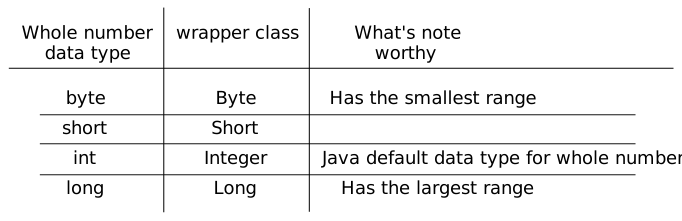
- Size or width, is the amount of space that determines (or limits) the range of values we've been discussing.
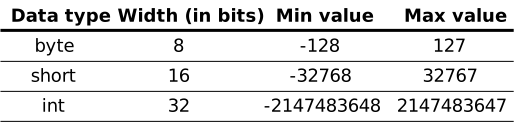
- A byte, can store 256 numbers and occupies eight bits, and has a width of 8.
The byte data type
- The minimum value of byte is - 128.
- The maximum value of byte is 127.
- Given its small range, you probably won't be using the byte data type a lot.
- The byte wrapper class is the Byte with a capital B.
- Smaller data type take small space and they are easy to access.It can be useful when we are using smaller range of values in our code.
jshell> System.out.print(Byte.MIN_VALUE);
-128
jshell> System.out.print(Byte.MAX_VALUE);
127
short datatype
jshell> System.out.print(Short.MIN_VALUE);
-32768
jshell> System.out.print(Short.MAX_VALUE);
32767
- Both byte and short, have the same overflow and underflow issue as the int data type has, but oviously with their own range of numbers.
long data
- Java allows certain numeric literals to have a suffix appended to the value, to force it to be a different data type from the default type.
- The long is one of this type and it's suffix is an 'L'.
- This is one of the few instances Java is not case sensitive, a lowercase 'l' or an uppercase 'L' at the end of a whole number mean the same thing - the number is a long.
jshell> long myLongValue = 100L;
myLongValue ==> 100
- Range of long data type is very large.
jshell>  System.out.print(Long.MAX_VALUE);
9223372036854775807
jshell> System.out.print(Long.MIN_VALUE);
-9223372036854775808
- We can easily store a number without using 'L' suffix when it is within the range of integer but when the number goes out of the integer range we get an error.
jshell> long bigLongLiteralValue = 2147483647;
bigLongLiteralValue ==> 2147483647

jshell> long bigLongLiteralValue = 2147483647235;
|  Error:
|  integer number too large
|  long bigLongLiteralValue = 2147483647235;
When is L is required?
- A numberic literal that exceeds Integer.MAX_VALUE must use the 'L' suffix.
- We cannot create a numeric literal in Java, that exceeds Integer.MAX_VALUE, without using the 'L' suffix, we'll always get the error 'integer number too large'.
jshell> long bigLongLiteralValue = 2147483647235L;
bigLongLiteralValue ==> 2147483647235
- Now the number will be accepted.
Java Data Type Conversion
Java can automatically convert numbers from int to smaller types like short.
        int intValue = 32768; // This value fits into an int
        short shortValue = 32768; // Error: incompatible types
Java checks if the value fits into the target type.
short shortValue = 32767; // No error, fits into a shortIf the value fits, Java allows the assignment.
Casting in Java
Declaring multiple variable in single statement ↓
jshell>  short myMinShortValue = Short.MIN_VALUE; int myMinIntValue = Integer.MIN_VALUE;  // using ';' to separate two distinct datatype.
myMinShortValue ==> -32768
myMinIntValue ==> -2147483648

jshell> byte myMinByteValue = Byte.MIN_VALUE, myMaxByteValue = Byte.MAX_VALUE; // can use ',' if both datatype are same.
myMinByteValue ==> -128
myMaxByteValue ==> 127

jshell> short firstShort = 1; int firstInteger = 2;
firstShort ==> 1
firstInteger ==> 2

jshell> byte firstByte = 1, secondByte = 2;
firstByte ==> 1
secondByte ==> 2
Performing some arithmetic operations on the above declared variables.
Starting with int.
jshell> int myTotal = myMinIntValue / 2;
myTotal ==> -1073741824
- It gives no error.
Now doing arithmetic with byte.
jshell>  byte myNewByteValue = (myMinByteValue / 2);
|  Error:
|  incompatible types: possible lossy conversion from int to byte
|   byte myNewByteValue = (myMinByteValue / 2);
- This throws an error.
- Althrough the result can fit into the variable but it gives error and in case of constant literals
there is not error because constant literals
are treated differently because their values are known at compile time, enabling Java to perform
accurate type promotion without the risk of data loss. This is in contrast to variables or
expressions involving variables, where Java's cautious approach to potential data loss requires
explicit casting to indicate the programmer's intention.
- Implicit Casting: When you perform arithmetic operations involving different data types,
Java automatically performs implicit casting (also known as widening conversion) to ensure
that the result is not lost or truncated. This is done to ensure accuracy and prevent
unintended behavior.
For example, if you're dividing two byte values, the result might not fit within the range of a byte. Therefore, Java promotes the result to an int to avoid data loss. However, if you're assigning that result to a byte variable without explicit casting, Java sees a potential data loss and raises an error, as it wants to ensure that you're aware of this potential issue. - Type Promotion:
Type promotion, also known as type coercion or automatic type conversion, is the implicit
conversion of values from a smaller data type to a larger data type. This happens when
performing operations between values of different data types. Java automatically promotes
values to a larger data type to prevent loss of information and ensure accurate results.
For example, when you perform arithmetic operations between different data types, Java will promote the operands to the data type with higher precision before performing the operation. For instance, if you add an int and a double, the int will be promoted to a double before the addition. - Explicit Casting: Explicit casting, also known as type casting, involves manually converting a value from one data type to another by using casting operators. This is necessary when you want to convert a value to a smaller or less precise data type, where data loss might occur. Explicit casting allows the programmer to override Java's default type promotion behavior and make the intention clear.
- Implicit Casting: When you perform arithmetic operations involving different data types,
Java automatically performs implicit casting (also known as widening conversion) to ensure
that the result is not lost or truncated. This is done to ensure accuracy and prevent
unintended behavior.
- So to overcome this error we have to use casting.
Casting
- Casting means to treat or convert a number, from one type to another. We put the type we want to number to be, in parenthesis like this ↓
(byte) (myMinByteValue / 2);
jshell> byte myNewByteValue = (byte) (myMinByteValue / 2);
myNewByteValue ==> -64
What does it mean when Java defaults the data type to an int?
- We have seen that if there is int variable in expression and we assign it to int variable after performing some arithmetic oepration, it work because both are int.
- Now (someShortVariable / 2) which results in 'int' can't be assigned to short variable because an int can't be assigned to a short, because the compiler won't guess the right. But the result of (-128 / 2) is 'int', and this statement works the compiler can determine the result immediately, and knows the value fits into a short.
- byte myNewByteValue = (byte) (myMinByteValue / 2); this statement works because we are telling compiler to cast it.
- Java uses int by default that's why we have to cast it before assigning it.
- Advice : use integer data type more unless you have good reason to use other data type.
Primitive types challenge
- Your challenge is to create four new variables:
- A byte variable, set it to any valid byte number.
- A short variable, set it to any valid short number.
- A int variable, set it to any valid integer number.
- Lastly, create a variable of type long, make it equal to 50,000 plus 10 times the sum of the values of the first 3 variables (your byte, short and int).
jshell> byte firstByteNum = 10;
firstByteNum ==> 10

jshell> short firstShortNum = 10;
firstShortNum ==> 10

jshell> int firstIntNum = 10;
firstIntNum ==> 10

jshell> long totalSumNum = 50000L + ( 10 * (firstByteNum + firstShortNum + firstIntNum));
totalSumNum ==> 50300
- Without using type casting this still work because 50000L is long to all other variable get converted.
Float and Double primitives
Floating Point Numbers
Floating-point numbers are used to represent values with decimal fractions.
They have both a whole number part and a fractional part separated by a decimal point.
Examples: 2.5, -0.75, 123.456
Types of Floating Point Numbers
There are two primitive data types for floating point numbers in Java:
- float: Single-precision 32-bit floating point
- double: Double-precision 64-bit floating point (default for decimals)
Precision and Width
- Precision refers to the level of detail a data type can represent.
- Width refers to the number of bits used to store the data.
- float has less precision than double due to fewer bits (32 vs 64).
- float range: ±1.4 x 10^-45 to ±3.4 x 10^38
- double range: ±4.9 x 10^-324 to ±1.8 x 10^308
Use Case
- Use float when memory is a concern and precision is acceptable.
- Use double when higher precision is required, e.g., scientific calculations.
Default Data Type
- double is Java's default for decimals.
- Decimals are treated as doubles by default.
- Use f or F suffix for float.
dor D suffix for double (optional).
Casting and Suffix
- Cast to float to assign double to float.
- Use suffix or cast to clarify data type.
- Recommended to use suffix for clarity.
float num1 = 5.25f;
double num2 = 5.25;
Exam Code Segments
Java often uses code without f suffix in exams.
Unsuffixed decimal literals are considered double by default.
Be cautious about assigning them to float variables.
Decimal Literal Assignment
Assigning a double to a float variable without a suffix will raise an error.
Example: float num = 5.25; will cause an error.
Use f suffix or explicit casting to avoid errors.
Understanding Precision
double is more precise than float.
Use casting or suffix to match variable types and avoid precision issues.
Floating point precision and a challenge
Why is the double a better choice in most circumstances?
- Faster processing on modern computers.
- Compatibility with Java libraries and math functions.
- Precision and range considerations.
Floating Point Precision Tips
- Float and double are suitable for general floating point operations.
- Not recommended for precise calculations due to storage limitations.
- Java's BigDecimal class overcomes precision issues.
- BigDecimal provides accurate decimal representation.
- For precision, use BigDecimal instead of float or double.
- Java's library includes helpful classes like BigDecimal.
- Use float and double for general calculations.
- Consider float and double limitations for critical applications.
The char and boolean Primitive Data Types
char Data Type
- Used to store a single character.
- Declare using single quotes, like 'D'.
- Can represent letters, digits, symbols, etc.
- Not the same as a String, which uses double quotes for text.
char vs. String
- char stores a single character, String stores multiple characters.
- char literals in single quotes, String literals in double quotes.
- String variables to be covered in upcoming videos.
Limitation of char
Only allows storing one character; multiple characters cause errors.
char firstChar = 'D';
// Correct usage

char secondChar = 'DD';
// Error: unclosed character literal
Use Cases for char
- Char variables are designed for storing single characters.
- Example: Storing the last key pressed by a user in a game.
- Example: Programmatically iterating through alphabet letters.
Relevance of char
Char had more significance in Java's early days due to memory constraints.
In modern computers with abundant memory, memory concerns are less prominent.
Char Storage and Width
The char data type occupies two bytes (16 bits) in memory.
Stored as a 2-byte number, mapped to a specific character by Java.
Unlike numeric types, chars are tailored to represent characters, not numbers.
Understanding Unicode
- Unicode is an international encoding standard.
- It assigns a unique numeric value to each letter, digit, or symbol across languages and scripts.
- Allows representation of characters beyond English, including special symbols and non-Latin alphabets.
Utilizing Unicode in Java
- In Java, you can set special characters using Unicode values.
- Unicode values are represented as hexadecimal escape sequences (e.g., '\u0024' for '$').
Unicode's Power
Unicode optimally uses the two-byte storage capacity of a char.
By leveraging these two bytes, a char can represent a vast range of 65,535 different characters.
Using Unicode Values
- Unicode values represent characters.
- Use column and row headers to derive the value.
- Java syntax: '\u' followed by four digits.
- Example: Unicode for 'D' is '\u0044'.
// Using Unicode for character 'D'
            char myChar = '\u0044';
Decimal Representations
- Decimal number 68 represents character 'D'.
- You can assign numeric literals to char variables.
// Assigning decimal value to char
char myDecimalCode = 68;
Three Ways to Assign char Values
- Literal character in single quotes.
- Unicode representation using '\u' notation.
- Assigning integer value representing character.
// Assigning character values in three ways
char myChar = 'D';
char myUnicodeChar = '\u0044';
char myDecimalChar = 68;
Challenge: Question-Mark Symbol
Create char variables for '?' using different methods.
char mySimpleChar = '?';
char myUnicodeChar = '\u003F';
char myDecimalChar = 63;
Introduction to boolean
- Boolean values allow two opposite choices: true or false.
- In Java, boolean is a primitive data type.
- Boolean can be set only to true or false.
- Wrapper class is Boolean with a capital B.
- Booleans are frequently used in programming.
Creating Boolean Variables
A boolean can have two values: true or false.
// Creating boolean variables
boolean isCustomerOver21 = true;
boolean hasDiscount = false;
Practical Use of Booleans
- Example: Check if a customer is over the age of 21.
- Naming convention often uses "is" as a prefix.
- Intuitive reading: isCustomerOver21 = true;
- Other prefixes can be used based on context.
- Examples: isMarried, hasChildren.
Primitive type recap and the String data type
Primitive Data Types in Java
- byte, short, int, long, float, double, char, boolean
- Each type has a specific size and purpose
- byte: -128 to 127
- int: commonly used for integers
- double: commonly used for floating-point numbers
- boolean: represents true or false values
- long, char: less frequently used
- short, float, byte: rarely used
Choosing the Right Data Type
- Selecting the appropriate type for memory efficiency
- Experience helps determine the best fit
- Integral types (e.g., int) for whole numbers
- Floating-point types (e.g., double) for decimal numbers
- boolean for logical decisions
Introduction to Classes and Wrapper Classes
- Java's primitive types and built-in classes
- Wrapper classes provide object-oriented features for primitives
- Wrapper classes include Integer, Double, Boolean, etc.
- Extra functionality: methods, conversions, comparisons
- Useful when primitives need to be treated as objects
The String Class
- String is a class in Java, not a primitive type
- Special treatment for ease of use
- Used for representing sequences of characters
- Immutable: Cannot be changed once created
- Common operations: concatenation, substring, length
String in Java
Stringis a class representing sequences of characters- Unlike the
charprimitive, it can hold multiple characters - Limited by memory space, theoretically up to
MAX_VALUEof anint - For example, on typical systems, it can hold around 2.14 billion characters
Using String Variables
- Strings can be assigned directly, similar to primitive variables
- Example:
String myString = "Hello, World!";
- Concatenation operator (+) for combining strings
- Example:
String result = "Hello, " + "John";
Concatenation and Unicode
- Concatenation operator (+) also used for output
- Example:
System.out.println("Result: " + result);
- Unicode characters can be used in strings
- Unicode value represented with \u followed by hexadecimal value
- Example:
String dollarString = "I wish I had \u00241,000,000";
- Unicode values retrieved from sources like unicode-table.com
- Useful for including symbols not available on the keyboard
Executing Multiple Lines in JShell
- JShell allows running multiple statements at once
- Use opening and closing curly braces to define a block of statements
- No semicolon needed after the closing curly brace
- Statements within a block executed in order
- Output doesn't display variable values, only explicit print statements
- Alternative to typing multiple statements on a single line
{
int a = 10;
int b = 20;
System.out.println(a + b);
}
Concatenating Variables and Data Types
- Using the plus operator (+) for concatenation
- When mixing numeric data types with strings, conversion occurs
- Example:
int num1 = 250;
double num2 = 49.45;
String result = num1 + " " + num2;
System.out.println(result);  // Output: 250 49.45
- Concatenation operator is context-sensitive
- With strings, + means concatenation
- Java converts numeric values to strings for concatenation
- Actual math operations are not performed
String Immutability and Efficiency
- String's sequence of characters are immutable
- Immutable means a String cannot be changed after creation
- Operations on strings create new strings
- Example: String result = lastString + " " + 120.47;
- Java creates a new string with concatenated value
- Old string discarded, inefficient for multiple operations
- Java provides StringBuilder for more efficient string operations
String vs. StringBuilder
- String: Immutable, sequence of characters cannot be changed
- StringBuilder: Mutable, sequence of characters can be modified
- Use String when the value won't change (e.g., constants)
- Use StringBuilder when value will change frequently
String Examples
- Immutable nature of String
- Creating new strings for every operation
- Example:
String str = "Hello";
str = str + ", World!";
System.out.println(str);
StringBuilder Examples
- Mutable nature of StringBuilder
- Efficient for frequent modifications
- Example:
StringBuilder builder = new StringBuilder("Hello");
builder.append(", World!");
System.out.println(builder.toString());
Using String Concatenation Operator
- The String is so intrinsic to the Java language, it can be used like a 9th primitive type. But it's not a primitive type at all, it's a class; From your point of view, you can treat the String like a 9th primitive type, by directly assigning a String literal to it and using the plus operators with it.
- Concatenation with + operator common for string operations
- Example:
String name = "John";
String message = "Hello, " + name;
System.out.println(message);
- Operators like +, -, *, / in Java
- Operators perform specific actions on operands
- Will explore operators in more detail in the next video
Operators, Operands and Expressions
Operators and Operands
- Operators: Special symbols for specific operations
- Operands: Objects manipulated by operators
- Example:
int sum = 15 + 12; // Sum is the result of adding 15 and 12
Expressions
- Expressions combine variables, literals, method returns, and operators
- Forming and combining values to produce results
- Example:
int result = 15 + 12; // result is the expression evaluating to 27
Major Operators
- Operators perform operations on operands and return results
- Assignment Operator:
= - Addition Operator:
+ - Subtraction Operator:
- - Multiplication Operator:
* - Division Operator:
/
Using Operators in Code
- Operators in expressions and assignments
- Example:
int result = 1 + 2; // result is assigned the sum of 1 and 2
- Operators often used on two operands
- Expression can contain multiple expressions and operands
- Comments ignored by computer, for human understanding
Assignment Operator and Independence of Variables
- Assignment Operator (=) assigns value to variable
- Variables are independent after assignment
- Example:
int result = 3;
int previousResult = result; // previousResult assigned value of result
result = result - 1; // result becomes 2
// previousResult remains 3
System.out.print(previousResult); // Output: 3
Character and String Concatenation
- Char holds single character, String holds multiple characters
- Char + operator adds char values as numbers
- Example:
char firstChar = 'A';
char secondChar = 'B';
System.out.println(firstChar + secondChar); // Output: 131
Char and String Concatenation (Cont.)
- Chars stored as 2-byte numbers
- Plus operator adds char values as numbers
- Decimal values of 'A' and 'B' are 65 and 66
- Example with String concatenation:
char firstChar = 'A';
char secondChar = 'B';
String concatenated = "" + firstChar + secondChar;
System.out.println(concatenated); // Output: AB
Mathematical Operators
- Multiplication Operator: *
- Division Operator: /
- Remainder Operator: % (Modulus)
              int result = 2;
result = result * 10; // Result: 20 (2 * 10)
result = result / 4; // Result: 5 (20 / 4)
result = result % 3; // Result: 2 (5 % 3)
Remainder Operator (Modulus)
- Remainder Operator (%) returns remaining value after division
- Result is 0 if no remainder
- Examples:
10 % 5 = 0
10 % 2 = 0
10 % 3 = 1
10 % 1 = 0
Using Remainder Operator
- Remainder operator useful for various scenarios
- Example:
int result = 5;
result = result % 3; // Result: 2 (5 % 3)
Summary of Operators
- Mathematical operators: +, -, *, /, %
- + used for String concatenation
- No operators applicable to boolean
- All operators applicable to char
Abbreviating Operators
Using Curly Braces and Grouping
In Java, curly braces are used to group multiple statements together for execution as a single unit.
Benefits of using curly braces:
- Groups statements for organized code
- Allows multiple statements on separate lines
- Enhances readability
Important considerations:
- Semi-colons are required to end each statement
- Closely resembles the structure of Java code
- Curly braces ensure clear scope and execution order
Increment and Decrement Operators
Increment and decrement operators are used to modify the value of a variable by a fixed amount.
Increment:
- result++ (post-fix)
- result += 1 (compound assignment)
Decrement:
- result-- (post-fix)
- result -= 1 (compound assignment)
Example:
int result = 1;
result++;    // Increment by 1, Result: 2
result--;    // Decrement by 1, Result: 1
result += 5; // Increment by 5, Result: 6
result -= 1; // Decrement by 1, Result: 5
Compound Assignment Operator
The compound assignment operator is a shorthand way of performing an operation and assigning the result.
Example:
int result = 1;
result += 5; // Equivalent to result = result + 5, Result: 6
Compound Assignment Operators
Compound assignment operators provide shorthand notation for performing operations and assignments.
Examples of compound operators:
- x += y (addition)
- x -= y (subtraction)
- x *= y (multiplication)
- x /= y (division)
Implicit casting and data type compatibility considerations:
- Implicit casts may occur with compound operators
- Data type compatibility is crucial to prevent unexpected behavior
Using Compound Minus Operator
Challenges with compound minus operator:
- The compound minus operator hides potential data type conversion errors
- Lossy conversion error occurs when incompatible data types are used
Solution to preserve expected behavior:
- Ensure variable data type matches the value being subtracted
- Explicit casting may be needed to handle data type differences
Completion of Compound Operators
Exploration of other compound assignment operators:
- x *= y (multiplication)
- x /= y (division)
Data type compatibility is vital for compound operators to work as expected.
Usage of shorthand operators:
- Enhance code readability and efficiency
- Facilitate frequent operations like increment and decrement
- Common in loop constructs
Further exploration of looping and additional shorthand operators in later sections.